
SEO & DEV TOOLS — Free Google Search Tester
Download Google Auto Searcher for Windows, watch the video, and find setup, local keyword research, Google Search Console, and troubleshooting help by topic.
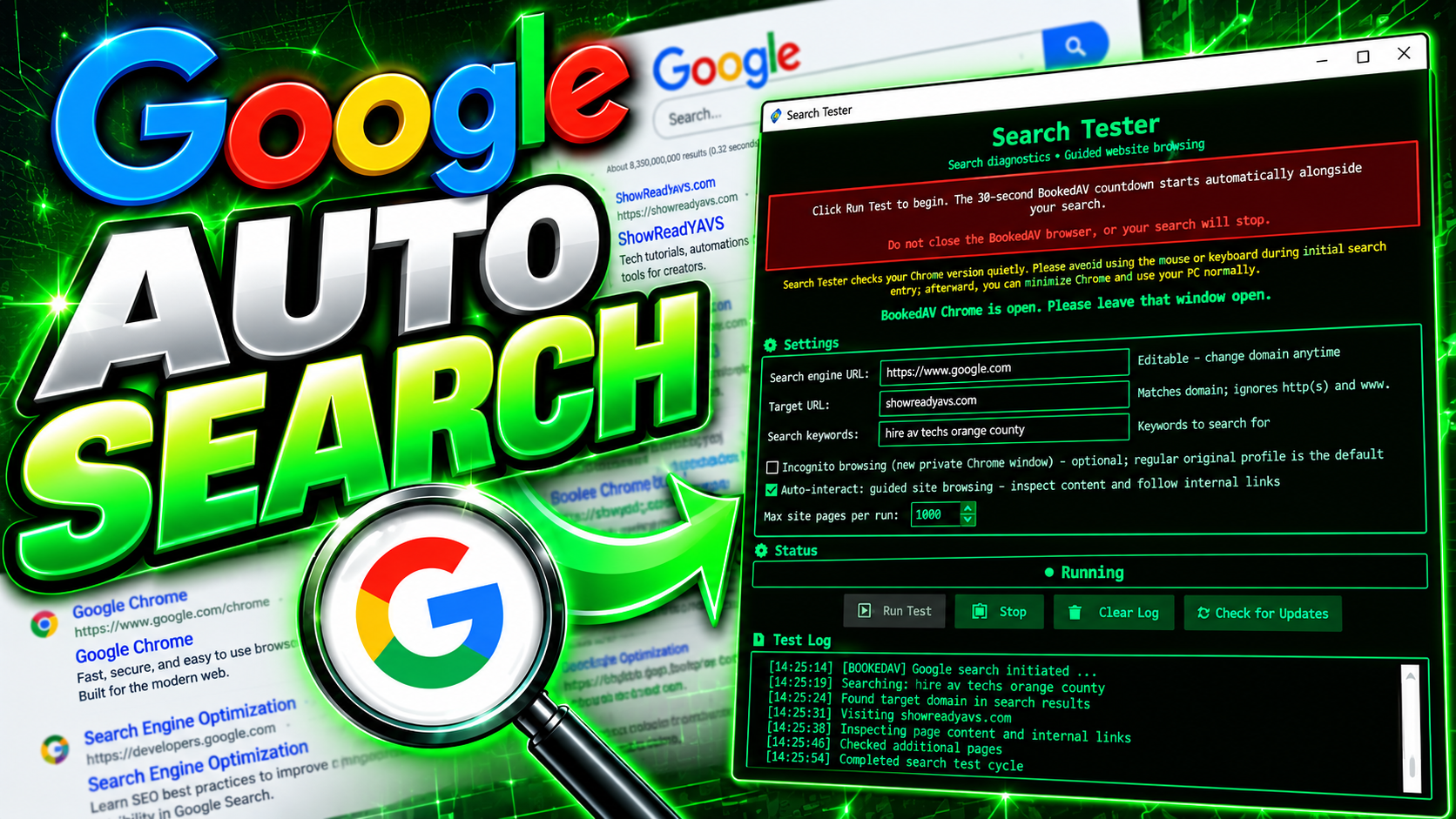
See Google Auto Searcher in Action
 ▶ Watch video ↗
What Is Google Auto Searcher?
Google Auto Searcher, also called Search Tester, is a free Windows desktop utility for checking whether your website appears in the Google search results inspected for a chosen keyword. Enter a target domain and search phrase to run a Chrome-based visibility check, view the Status and Test Log, and optionally inspect matching results and follow links on your own website. It is a search-research tool, not a Google indexing service or a ranking improvement guarantee.
Quick Start — Test Your Website's Search Visibility
1. Download Google Auto Searcher for Windows and read the included README. Chrome is used for the browser-based checks.
2. Enter your website's domain in Target URL, then enter a search phrase that potential customers might use (for example, “wedding photographer Irvine CA”).
3. Click Run Test. Review the Status and Test Log to see which Google results were inspected and whether your domain appeared.
4. Check a branded search and a service-plus-city search separately. One observed result is not a stable ranking or proof that a page is indexed.
5. For actual indexing status, use URL Inspection in Google Search Console. Search Tester does not submit pages for indexing and cannot guarantee rankings.
This version also opens a separate BookedAV search window after its countdown. Keep that window open or minimized while the test runs, as described below.
Important — Keep the BookedAV Chrome Window Open
This version opens a second Chrome window for a separate BookedAV search check after an approximately 30-second countdown. Keep that window open while Search Tester runs; you can minimize it. Closing the second window may stop the entire session, including your original test. The BookedAV check may retry with a branded query if an unbranded search finds no match.
Getting Started — Download and Run a Search Test
How do I use Google Auto Searcher step by step?
1. Download the free Windows EXE and review the README.
2. Open Search Tester; for ordinary Google testing, leave Search engine URL set to https://www.google.com.
3. Enter your website domain in Target URL (for example, yourbusiness.com).
4. Enter a realistic customer search in Search keywords, such as “wedding photographer Irvine CA” or “mobile auto detailing Anaheim.”
5. Optionally choose Incognito and Auto-interact: guided site browsing; set Max site pages per run to limit unique pages visited on your website.
6. Select Run Test and follow Status and Test Log to see whether a matching result appears and which actions were attempted.
7. Select Stop when needed. Avoid interrupting Chrome during the initial browser check and search entry.
What can the free Google search testing tool do?
Google Auto Searcher searches for a keyword, checks the Google result pages it scans for your target website, reports observations in the Status and Test Log, and can open a matching site result. With guided browsing enabled, it can inspect internal pages on your own website up to the Max site pages per run setting. Incognito browsing and a Stop control are available; the desktop application also supports checking for software updates. The max pages setting controls unique pages on your own site and is different from the number of Google result pages inspected.
Do I need Windows, Chrome, or another device?
The download is a Windows 64-bit EXE, not a native macOS, iPhone, Android, or other mobile app. It uses Chrome for browser-based checks. Chrome or ChromeDriver loading errors can interrupt a run; consult the downloadable README for operational details.
Is Google Auto Searcher free?
Yes. OCDIR provides Google Auto Searcher and its README as free downloads. The utility is intended for website owners, local businesses, SEO beginners, and web developers checking search-result visibility.
Local SEO Keywords and Google Search Console
Which Google search keywords should I test for a local business?
Start with phrases a real customer might use. Examples include a broad term such as “electrician”; a regional term such as “electrician Orange County”; service plus city such as “emergency electrician Irvine CA”; or a more specific customer need such as “commercial electrical repair Anaheim.” Test your business name and its domain as separate branded discovery checks. Begin with the most relevant service-and-location searches rather than repeating only your brand name.
Are branded searches the same as ranking for local service keywords?
No. Finding “Your Business Name electrician” or “Your Business Name yourbusiness.com” can help locate your website but does not establish that it ranks for unbranded searches such as “electrician Orange County.” Compare branded and service-keyword tests separately and avoid interpreting a one-time result as a fixed ranking.
How should I record local keyword test results?
Keep a simple log of the search phrase, date, approximate search location, whether your website appeared, and any observed result page. Search results can change with device, location, time, search settings and personalization, so individual observations are not reliable guarantees of position or traffic.
How do I use Google Search Console with this tool?
Google Search Console at https://search.google.com/search-console/ is Google's first-party service for verified website owners. In Performance → Search results, review the Queries table for relevant impressions, clicks and average position over a chosen date range, such as three months. Use relevant queries as ideas for separate Search Tester checks. Google Search Console reports measured search activity over time; a live browser test shows what one search session observes. They may differ.
Can Search Tester replace Google Search Console or a full SEO audit?
No. The utility performs limited browser-based search checks. Google Search Console offers first-party performance and URL indexing information, while technical SEO audits examine site structure, content and crawlability. Search Tester also does not replace Google Maps/local-pack analysis or a full Google Business Profile review.
Google Indexing and Crawl Status — Troubleshooting
What does 'Crawled – currently not indexed' mean?
Google crawled the page but has not included it in its search index. This is not automatically a technical error, and it may be indexed later. In Google Search Console, inspect the URL and review the rendered page, title, content and canonical. Clicking Validate Fix does not force indexing.
What should I check before trying to fix an indexing issue?
Check HTTP status, robots.txt crawl permission, absence of a noindex directive, the canonical URL, whether the main text actually renders, relevant internal links, and whether the page offers distinct useful content. Google may still choose not to index a technically eligible page.
Should I redirect an outdated or empty page?
For an old page with an equivalent replacement, prefer a server-side permanent HTTP 301 or 308 redirect to the most relevant destination. Update internal links. If a page is permanently removed with no replacement, use an appropriate 404 or 410. A nearly empty HTTP 200 page is not a redirect; changing a title alone will not repair it.
Request Indexing or Validate Fix: which should I use?
Use URL Inspection and Test Live URL to examine a specific page. Request Indexing asks Google to recrawl but does not guarantee inclusion. Validate Fix checks whether a reported condition changed; it cannot force Google to index content. For 'Crawled – currently not indexed', Google says resubmission is not necessary.
Will Google Auto Searcher increase my Google rank?
No. Google Auto Searcher checks selected search results in a browser session and records what it observed. It cannot influence rankings or indexing. Use Google Search Console for first-party indexing and search-performance information.
Troubleshooting Searches and Visibility
What if my business website does not appear in the search test?
A missing result may reflect a competitive keyword, geographic differences, changing results, or the limited Google result pages inspected. It does not prove your site is missing from Google. Try a more specific service-plus-city phrase, then a branded phrase, then a domain-containing search. Review the URL Inspection report for important pages in Google Search Console.
What if Google asks for verification or the browser does not load?
If Google displays a security or verification challenge, follow its normal manual process; the tool does not bypass that challenge. Chrome, ChromeDriver, connection, or page-loading problems can interrupt an automated test. Avoid interacting during initial automatic search entry, and use the README for setup details.
What SEO improvements should I check if a page is not visible?
Check that your website has helpful service information, descriptive page titles, natural location details, accessible internal links and a clear page purpose. Verify indexing in Google Search Console and distinguish an indexing problem from a page that simply does not rank for one competitive phrase. Repeated test searches alone do not improve rankings.
Why do Google Maps results and regular website results differ?
Local-pack and Google Maps results are different from standard organic web results. Search Tester is a browser-based web-search visibility tool; it does not provide a complete evaluation of map placement, local-profile quality, or every search feature.
Current Version, Updates and Responsible Use
What is the second Chrome window used for?
This release starts a separate BookedAV search-visibility check in a second Chrome window after an approximately 30-second on-screen countdown. It uses a preselected query and may try a BookedAV-branded query if an unbranded query finds no match. These are separate from your requested website search. Keep the second window open, or minimize it; closing it can stop the complete test session.
Can I stop the test or check for newer versions?
Use Stop to end the running session. Google Auto Searcher also includes an in-app update check for newer releases. Review the downloadable README for details about the installed version and expected browser behavior.
Will repeated tests improve my Google position or generate sales?
No. Google Auto Searcher does not promise ranking improvement, more visitors, indexing, inquiries or sales. It is designed for occasional observation and research, not traffic inflation or search-engine manipulation.
How should the tool be used responsibly?
Use reasonable, occasional diagnostics for websites you own or manage. Do not use automated searches for artificial traffic, ranking manipulation, or excessive load on third-party websites. Respect Google and other websites' terms, verification challenges, and rate limits. Obtain program downloads from OCDIR.